PostThisAd Software Tutorial

Before you continue reading the Tutorial, we provide support by LiveChat, Email and TeamViewer. If this Tutorial doesn’t help, get in touch with us! We want you to trust the software, so we are here to guide you along the way.

Table of Contents:

Step 1: Create an Account.

Step 2: Download the Software.

Step 3: Login to the Software.

Step 4: Software Overview.

Step 5: How to post an Ad.

Step 6: Final Reminders.

Step 1:

Initially you will need to create an account with us. This does not need to be your Kijiji Credentials. You can make an account by clicking on this link: https://postthisad.com/new-order/

Once you have created the account with us, your free trial is effective. You can post your ads with us for a week. You can decide how often you want them to repost. We recommend a 2 to 5 hour frequency.

If you will encounter any problem with your account creation, please contact us at support@postthisad.com or talk to us via LiveChat in our website.

Step 2:

Now you will need to download the software. All of your Ads will be reposted automatically from your own computer.

You can download it here: PostThisAd-4.01-win32.msi

We only support Windows and not Mac OS X. Once it is downloaded and unzipped, you can install it onto your computer.

Step 3:

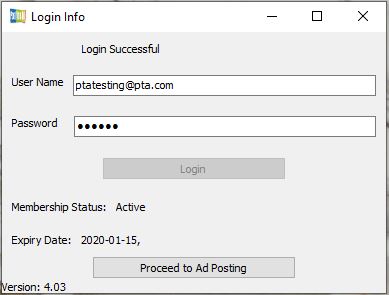
Open the software and login. You must use the same username and password you originally used to create an account with us. The software for Windows will look like this:
Step 4:

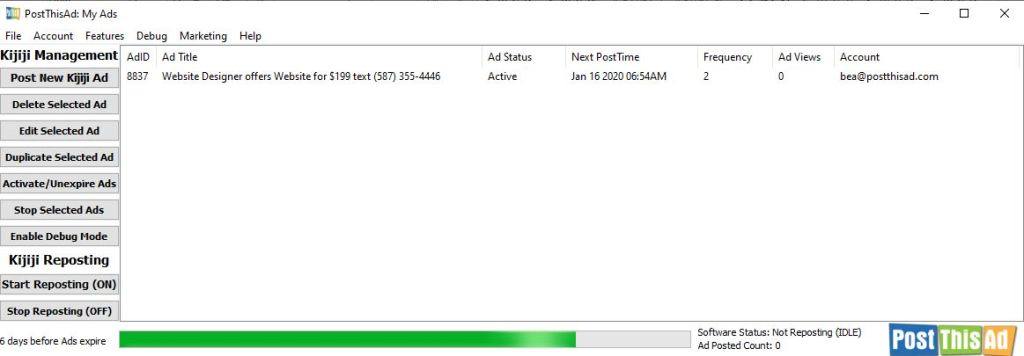
This step will mainly inform you of all the buttons and what they do. Once you click on “Proceed to Ad posting”, your page will look like this:
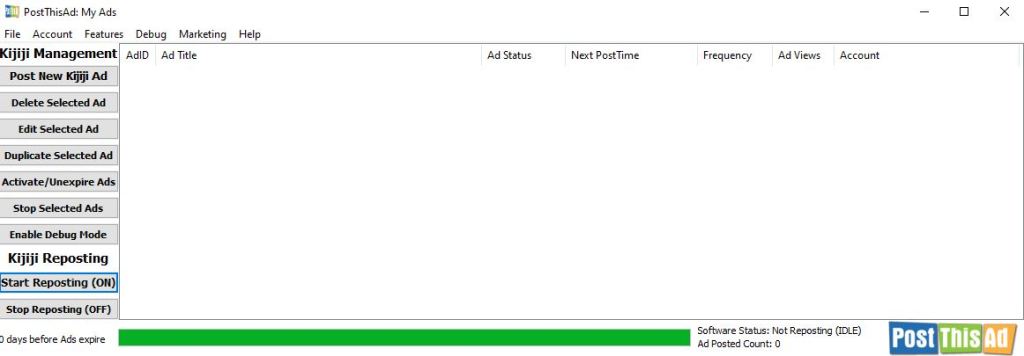
Left Column Buttons:

Post New Kijiji Ad: This is the button to create a new Ad.

Delete Selected Ad: This button deletes one of your Ads out of the tray. You must select an Ad, then click on Delete Ad to delete it.

Edit Selected Ad: Select an Ad and click this button to edit information. You can change things like, frequency, ad description, phone number, images etc.

Activate/ Unexpire Ad/s: This button resets the Ad status to “Active”. If your Ad expires or fails to post, you click this button to reset the status.

Stop Selected Ad: To stop an active ad, click on this button.

Enable Debug Log: You can ignore this button. If you have a problem, we will send you instructions on how to use this button.

Start Reposting: To start the reposting process, click on this button. It should turn green once it’s ON.

Step 5:

Fill up the rest of your Ads. It is recommended to have a PostThisAd folder on your desktop. Within this folder keep all your Ad Details and Ad Images. This is not necessary but it will help you stay organized.

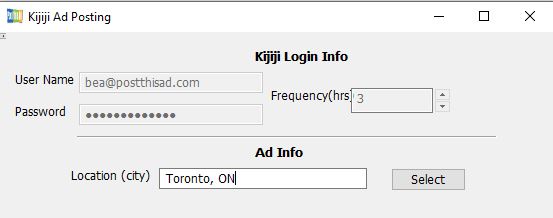
  1. Log in your Kijiji account and choose your frequency.
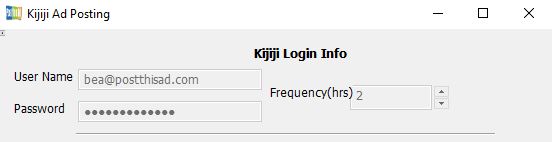
  • Type the location in the software:
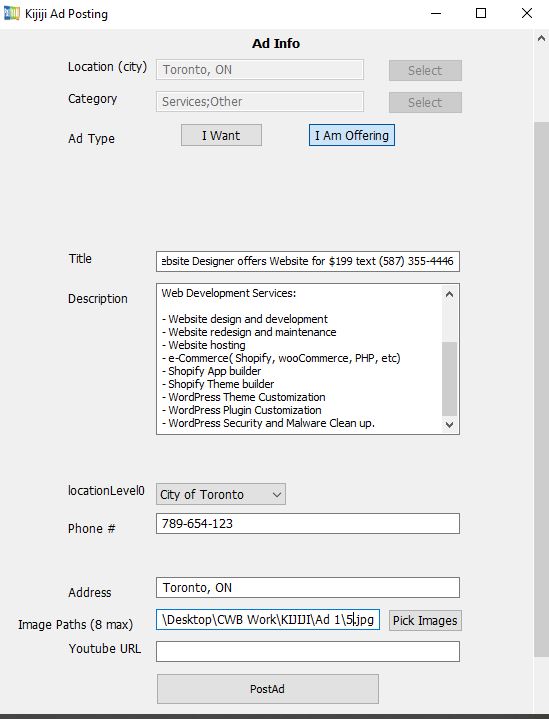
  • Click on select button to choose category.
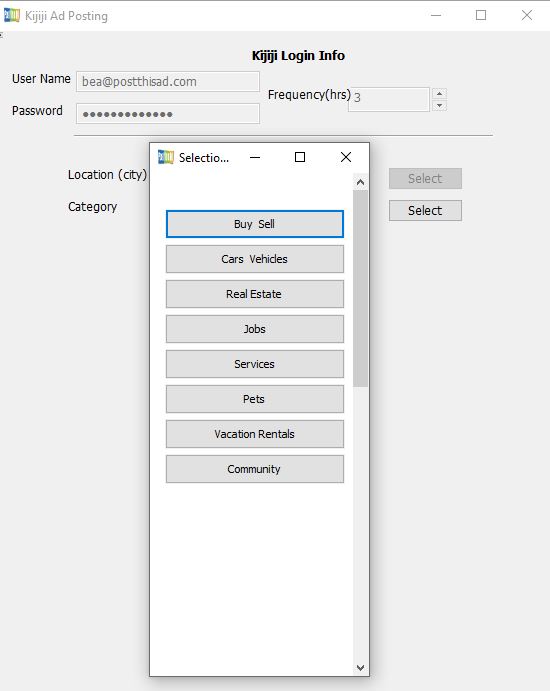
  • Fill out the rest of your ad details.
  • Once all fields are filled, click on PostAd.

You will be able to see the fields on chrome window (left) automatically being populated. It’s important to know that you should not click anywhere on this chrome window on the left, it’s just for you to see that the software will automatically repost the ad.

Posting will take anywhere from 30 seconds up to 5 minutes depending on your computer.

Once it is done, the Ad will show up in your Tray.
Step 6:

This is the last step. Do not forget to activate your ad and click on Start Reposting for the software to start the reposting process. To do this, highlight the ad and select “Activate/Unexpire Ad” then click on Start Reposting.
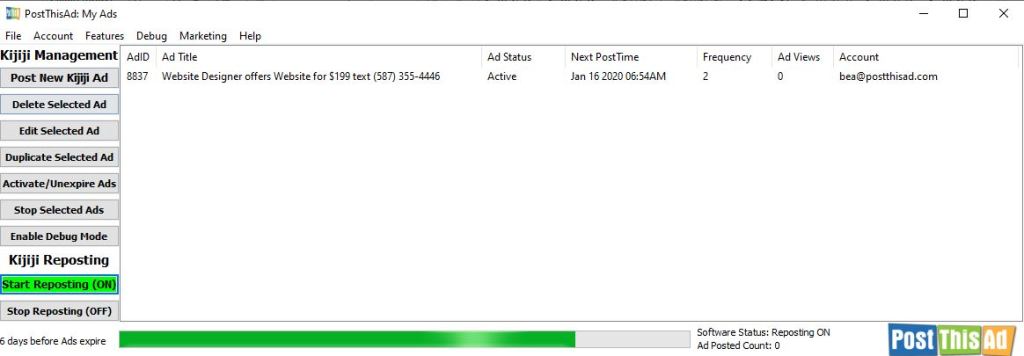
A chrome window will appear. You can minimize and let the software and chrome run in the background.

Additionally, you must keep the software open for it to post, it shouldn’t be closed. If your computer goes to sleep, all softwares stop working, including PostThisAd software. So you must configure your computer settings to avoid sleeping.

You can contact us via Email or LiveChat and we will answer any questions you may have.

Thank you!

How a website on your Kijiji Ad can help your business

You might think that having the perfect ad title, detailed ad description and high quality images is enough to promote your business in Kijiji, but have you ever thought of having your own website linked along with your ad details? Not only will buyers see your ad on Kijiji, you can drive them to your website where you can give them more information about the nature of your business.

Having a website has changed the way small businesses used to sell their products and services. In today’s advanced era, online advertisement has become highly recognized to promote one’s business in the hope of getting some perspective buyers.

Many of us may think that a website for a small business is unnecessary. According to recent studies, about 40% of all small businesses don’t have websites. But what we don’t know, website is a powerful marketing tool and could put you a step ahead of your competition. Here’s why.

Having a website establishes a strong online brand identity. This can help you gain a competitive advantage in your industry and improve your business image. A customer will see that you are a professional company which gives them more confidence to trust your product or service you are trying to offer or sell in the market.

You can use your website to tell people the nature of your business. Provide photos and detailed descriptions of your products or services. Explain how you can help them in their personal or professional lives. Your contact information such as your business phone number, email and address should be in your website too. This will give customers an idea that your business/ company is legit and can offer a reliable customer service.

At its simplest, a website provides a quick and easy way of communicating information between buyers and sellers. You can list your opening hours, contact information, show images of your location or products, and use contact forms to facilitate enquiries from potential customers or feedback from existing ones. You can even upload promotional videos to really engage your customers and sell your business in an effective and cost efficient way. This is also a good way to promote your social media channels and build up a community with your customers.

You can place your website links on your ads. When someone finds your listing interesting, they will click on the link to visit your website. The chances are more as you have enough space and flexibility to explain your services in an ad to convince the visitor.

To start your website, email us at Support@CanadianWebDesigns.ca

What is PostThisAd and how can it help you boost your ad in Kijiji?

Is your business on Kijiji? Or have you been trying for ways to get more responses on the product or item you are trying to sell?

Kijiji is the most popular site used by millions of users to buy or sell products and services. Since it’s a free classified ad site, it’s a great opportunity for everyone to advertise their business to wide range of audiences.

But one can only be successful in selling a product or service if they know how to use Kijiji effectively. Kijiji is very simple to use. You create an account and post your ad. But what makes an ad effective that could help you get more responses? Aside from having an eye catching ad title and good quality photos, chances are your ad moves down eventually before any potential buyers get to see it, and not everyone will have the time to go searching on page 5 or 10 of your category.

This is why we’re here to offer you the PostThisAd software. PostThisAd offers ad posting services for Kijiji. Kijiji also offer tools for ad promotion. Top Ad being one of the well-known, Bump Up, Highlight Ad and so on. But what makes PostThisAd different?

First of all, PostThisAd offers an affordable price for everyone. Kijiji’s paid promotions and other ad posting services offers a starting price of $100-150 monthly, while with PostThisAd you can start your monthly subscription for only $20.

Secondly, there are only few slots for paid ads and this goes on rotation, not to mention the great number of users paying for ad promotion in Kijiji, therefore your paid ad only shows up rarely on the top page. Even most users generally skip paid ads and move straight to regular ads.

Kijiji only allows 25 posts per day. To make sure you stay within the limit of posting, PostThisAd is set to have a maximum of 25 reposts per day only, as per Kijiji’s policy. PostThisAd will simply repost your ads automatically so you don’t have to. You just need to create your ads one time in the software and it will repost it for you for as long as you want. You can set the time hourly and there you go, your ad is ready and will be promoted to the first page at a time of your choice!

Choosing the right Kijiji marketing tool will completely change your business ‘growth and income and PostThisAd will do it for you to replace the labor-intensive tasks of manual reposting. This software is made to help everyone who wish to get an ad promotion in Kijiji with a friendly price.

Feel free to send us an email at support@postthisad.com for a free trial.

Design a site like this with WordPress.com
Get started